Sia Agent:Prepare for IB Math AI SLwith Your Personal Tutor.
Build a focused IB Mathematics AI SL study plan, then work through modelling, probability, statistics and calculator interpretation with live explanations and feedback on your handwritten working.
Use Sia Agent for explanations and study planning. Check the current Agent catalog and access details when you start.
Trusted by 2M+ students from 2,000+ universities and high schools worldwide
DukeNYUUCLACornellUC BerkeleyTorontoMichiganUSC
One task
Start with your own practice
Your pace
Time reserved for revision
Live Tutor
Discuss a difficult step
Agent
Study on Mac & Windows
IB Mathematics AI SL at a glanceLast reviewed
IB Mathematics AI SL is a distinct Diploma Programme course and assessment level. Keep your preparation matched to SL, your examination session and your school’s subject guide. SL combines written examinations and an internally assessed mathematical exploration.
IB
Exam / qualification family
SL
Check your exact level and syllabus
External papers and internal assessment
Assessment format
SL subject assessment
Assessment components
2026–2027
Use the timetable for your entry
Your centre
Confirm registration and venue
For 2027 assessment, use the current course; the new mathematics curriculum first assesses in 2029. Official examination information and the current syllabus take priority. AskSia is an independent study tool.
Choose what to work on
IB Math AI SL revision starts with the task you find difficult.
A fitted line is useful only within its assumptions. Distinguish association from causation and explain why extrapolating far beyond the observed data is risky.
First: understand the demand
Current syllabus and level
Knowwhat the task requires
Statistical models and interpretationModelling, probability, statistics and calculator interpretation
a regression prediction far outside the observed rangeCheck the data range, identify the explanatory variable and write a qualified prediction rather than a causal claim.
Then: test your understanding
Independent practice and review
Applythe method yourself
Check the scopeSL combines written examinations and an internally assessed mathematical exploration.Review
Read the commandUse technology to model and interpret rather than copying unexplained calculator output.Review
Explain the methodCheck the data range, identify the explanatory variable and write a qualified prediction rather than a causal claim.Review
Use evidenceA fitted line is useful only within its assumptions. Distinguish association from causation and explain why extrapolating far beyond the observed data is risky.Review
Review the attemptKeep your own attempted answer with the correction.Review
Try againCheck whether you can explain the next example without help.Review
These are study priorities and examples, not published assessment weightings. Use your own syllabus, paper requirements and recent attempts to decide where to spend the next session.
Bring a question. Work through it. Try the next one.
Choose this exam and level in Sia Agent, set your target and time remaining, and use the study plan to organise your next session.
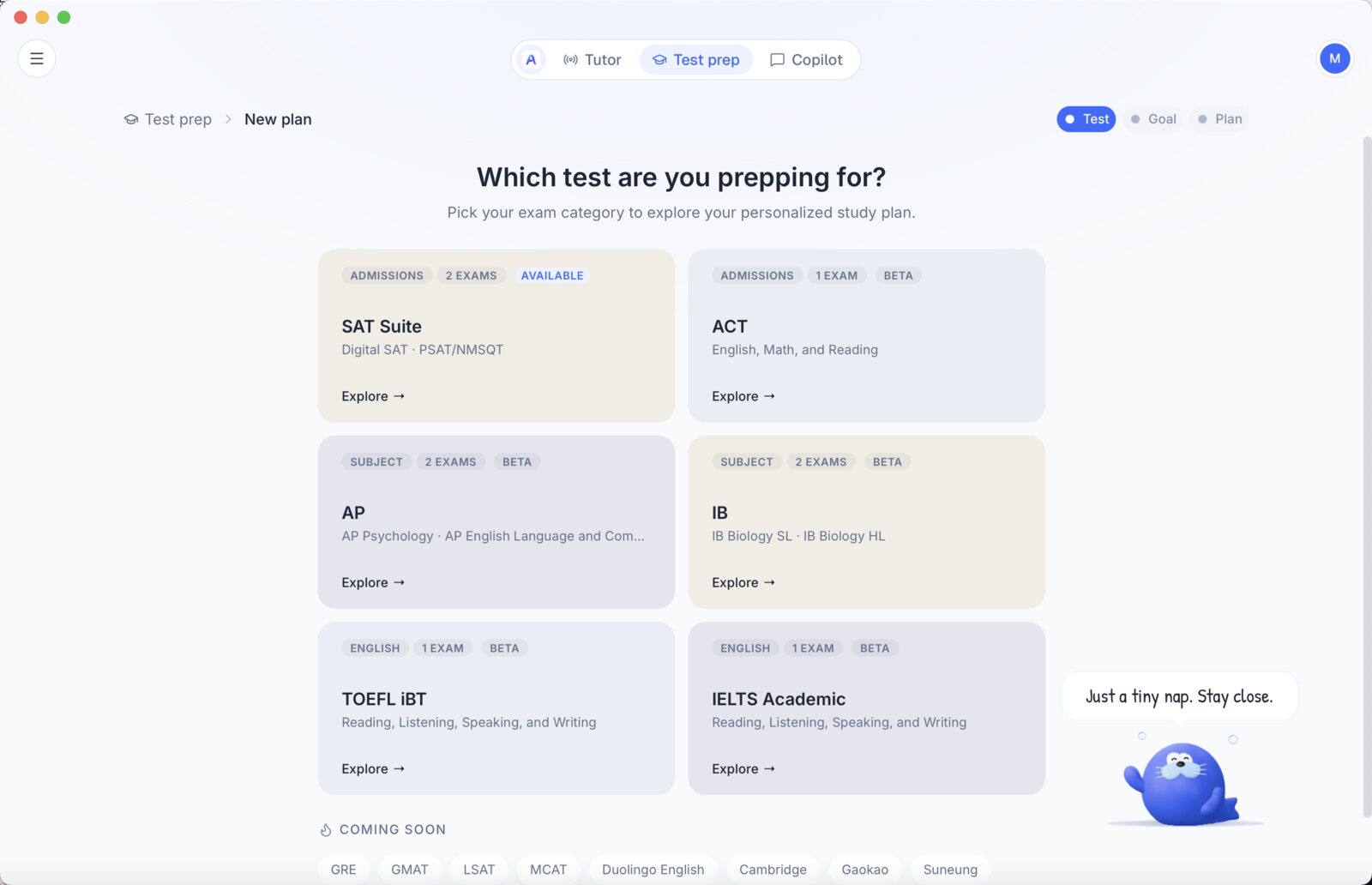
Actual Sia Agent screen · choosing a Test Prep exam.
Step 1
Match your course and target
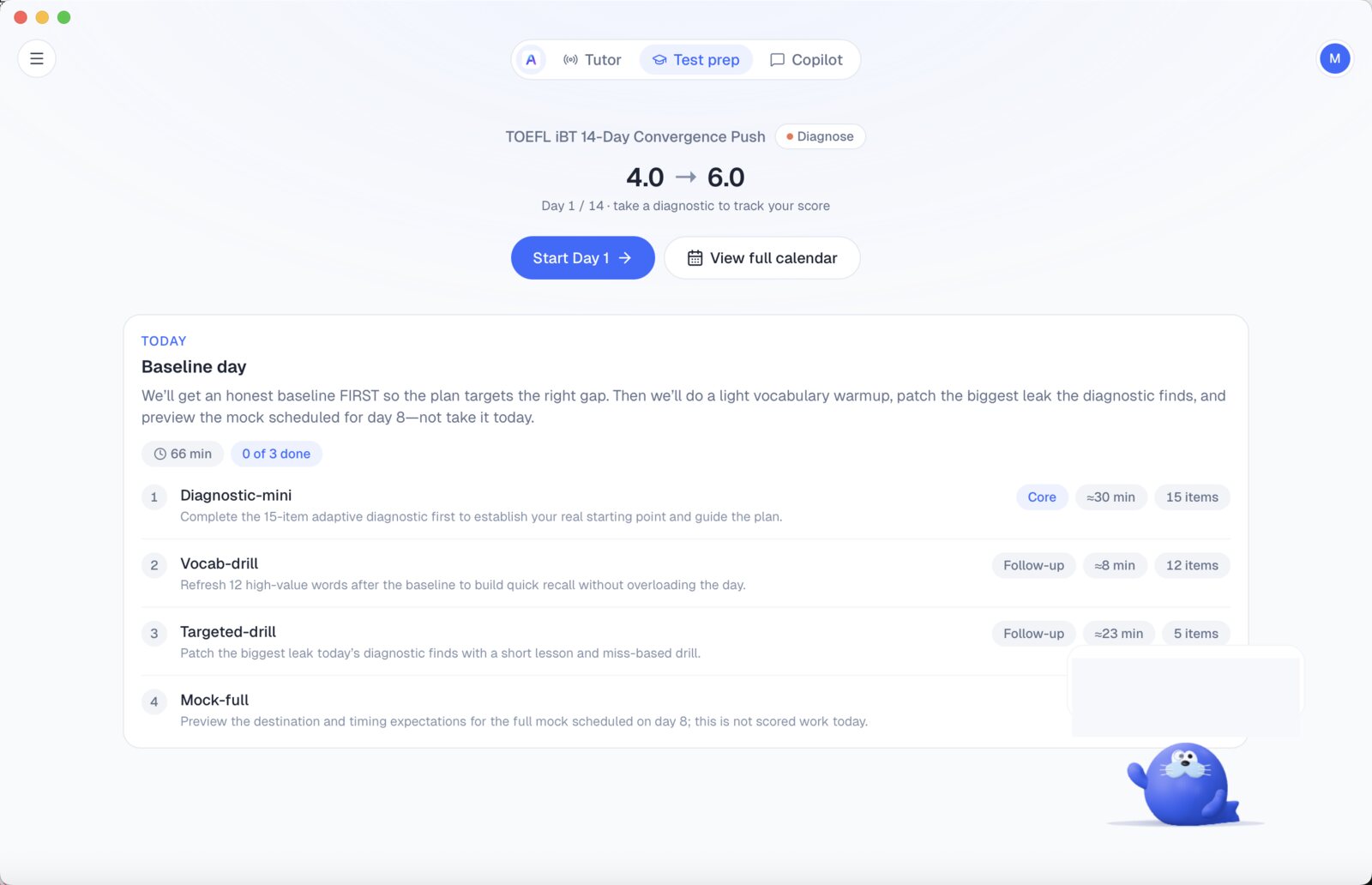
Sia Agent supports 30+ tests, with study plans built around your exam and target. Choose this exam and level in Sia Agent, set your target and time remaining, and use the study plan to organise your next session.
Actual Sia Agent screen · a day-by-day Test Prep plan.
Step 2
Work through the difficult part
Check the data range, identify the explanatory variable and write a qualified prediction rather than a causal claim.
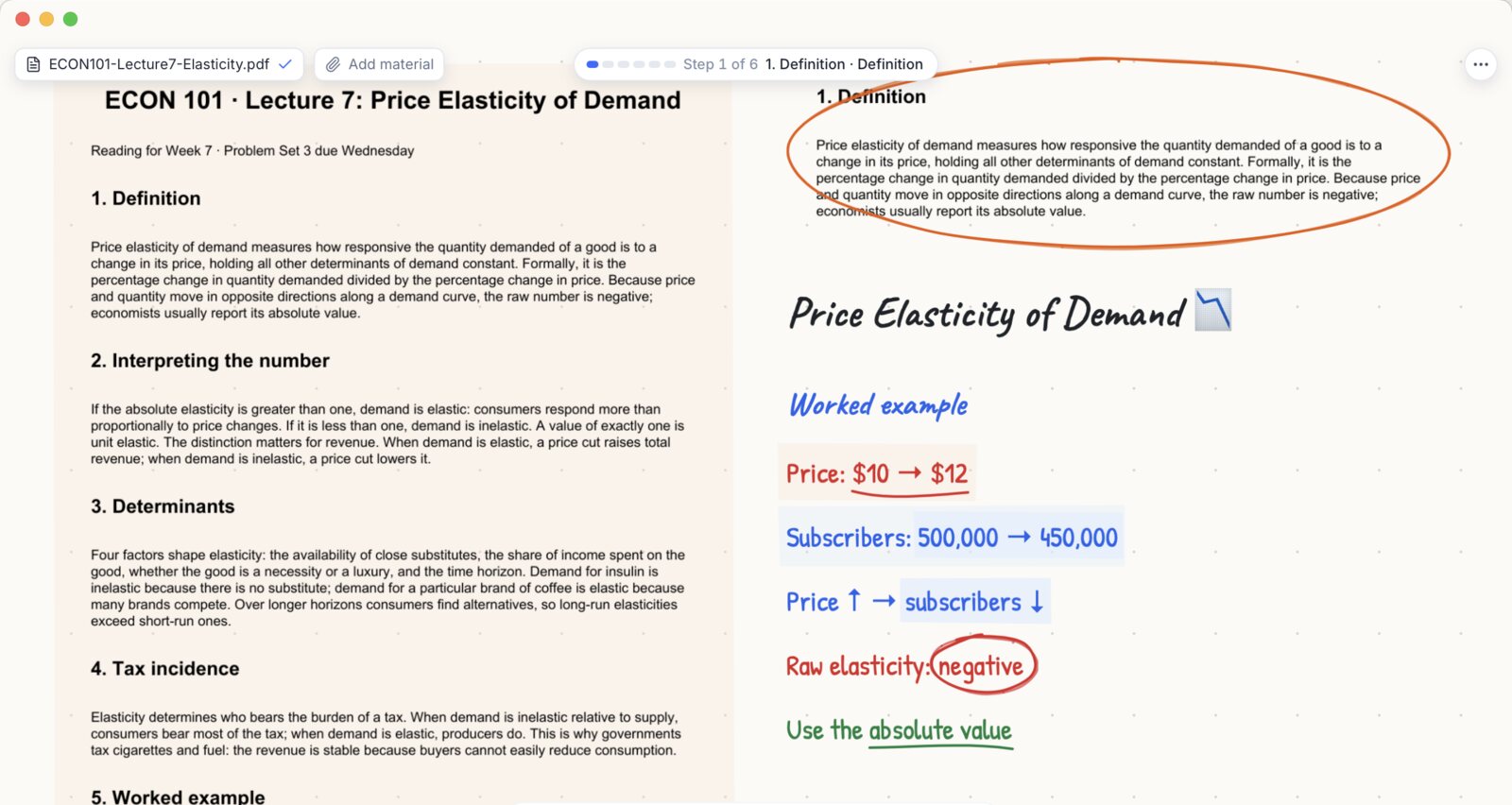
Actual Sia Agent screen · a live whiteboard lesson.
Step 3
Practise the reasoning again
Start with a regression prediction far outside the observed range. After discussing it, attempt another example independently.
SL combines written examinations and an internally assessed mathematical exploration.
Statistical models and interpretation
A fitted line is useful only within its assumptions. Distinguish association from causation and explain why extrapolating far beyond the observed data is risky.
Match the paper requirements
Use technology to model and interpret rather than copying unexplained calculator output.
Practise independently
For 2027 assessment, use the current course; the new mathematics curriculum first assesses in 2029.
Use the current assessment framework. Tutoring feedback is a study aid, not an official grade.
A revision example
Look at the reasoning, one step at a time.
Check the data range, identify the explanatory variable and write a qualified prediction rather than a causal claim.
Illustrative learning scenario
A fitted model is y = 2 + 3x, based on observed x-values from 0 to 10. A student predicts y = 62 at x = 20. Discuss the prediction.
Try the task before opening the explanation. Then compare each step with your own reasoning.
Original teaching scenario by AskSia. This is not an official examination question or an official marked answer.
1Check the arithmetic
Substituting x = 20 gives y = 2 + 60 = 62.
Identify what the task asks before choosing a method.
2Check the data range
The proposed x-value lies outside the observed interval 0 to 10.
Check this step against the quantities or evidence given.
3Identify the limitation
The calculation is an extrapolation. The relationship may not continue with the same form outside the data range.
Keep the calculation or explanation tied to the task.
4Write a useful conclusion
62 is the model’s numerical output, but its reliability is not established by the fit within the observed range. A fitted association also does not establish causation.
Try another example without looking at this explanation.
Built around your study goal
Your exam, planned to the day.
Choose your exam and target, then follow your study plan and discuss difficult steps with Sia Agent.
Actual Sia Agent screen · choosing a Test Prep exam.
A specific starting point
Start with the right exam mode
Choose this exam and level in Sia Agent, set your target and time remaining, and use the study plan to organise your next session.
Statistical models and interpretation
Modelling, probability, statistics and calculator interpretation
Review your attempt before the next task
Actual Sia Agent screen · a day-by-day Test Prep plan.
A concrete learning task
Work through statistical models and interpretation
Check the data range, identify the explanatory variable and write a qualified prediction rather than a causal claim.
Statistical models and interpretation
Modelling, probability, statistics and calculator interpretation
Review your attempt before the next task
Actual Sia Agent screen · a live whiteboard lesson.
A conversation about your reasoning
Check my working
Upload a clear photo of your handwritten solution. Sia highlights a step to review and can explain it on the whiteboard.
Statistical models and interpretation
Modelling, probability, statistics and calculator interpretation
Review your attempt before the next task
IB Math AI SL practice
Practise the method you want to use in the exam.
A fitted line is useful only within its assumptions. Distinguish association from causation and explain why extrapolating far beyond the observed data is risky.
Start
Start with the right exam mode
Choose this exam and level in Sia Agent, set your target and time remaining, and use the study plan to organise your next session.
Explain
Work through statistical models and interpretation
Check the data range, identify the explanatory variable and write a qualified prediction rather than a causal claim.
Discuss
Check my working
Upload a clear photo of your handwritten solution. Sia highlights a step to review and can explain it on the whiteboard.
Revisit
Make the next session specific
After reviewing the error, attempt another question on modelling. Keep the question, your attempt and the correction together so the next session starts from what you actually missed.
1 · Attempt the task→2 · Discuss the reasoning→3 · Explain the correction→4 · Try again yourself
Use practice materials you are entitled to access. The learning scenario on this page is original; it is not an official question. AskSia is independent of the examination provider.
Mac & Windows · current access and system requirements on the Agent page
A familiar study companion
Use the same learning loop across your coursework.
IB Math AI SL is one context for working with the study material and questions you already have.
Your notes
Start from course material
Your attempt
Show the reasoning
Your next task
Use the explanation in practice
STUDY SCENARIO
Start with the right exam mode
Choose this exam and level in Sia Agent, set your target and time remaining, and use the study plan to organise your next session.
1
IB Math AI SL
Illustrative learning workflow
STUDY SCENARIO
Work through statistical models and interpretation
Check the data range, identify the explanatory variable and write a qualified prediction rather than a causal claim.
2
IB Math AI SL
Illustrative learning workflow
STUDY SCENARIO
Check my working
Upload a clear photo of your handwritten solution. Sia highlights a step to review and can explain it on the whiteboard.
3
IB Math AI SL
Illustrative learning workflow
STUDY SCENARIO
Make the next session specific
After reviewing the error, attempt another question on modelling. Keep the question, your attempt and the correction together so the next session starts from what you actually missed.
4
IB Math AI SL
Illustrative learning workflow
STUDY SCENARIO
Start with the right exam mode
Choose this exam and level in Sia Agent, set your target and time remaining, and use the study plan to organise your next session.
5
IB Math AI SL
Illustrative learning workflow
STUDY SCENARIO
Work through statistical models and interpretation
Check the data range, identify the explanatory variable and write a qualified prediction rather than a causal claim.
6
IB Math AI SL
Illustrative learning workflow
These cards illustrate learning workflows. They are not testimonials, exam results or promises of a score increase.
Use the right source for the job
Keep official information and study support connected.
Registration and official results belong to the examining body. Use your course material and tutoring for preparation.
IB Math AI SL preparation roles
Task
Sia Agent
Exam provider
Your own practice
Teacher / school
Understand a difficult step
Discuss and ask questions
Published guidance
Attempt the method
Course-specific feedback
Choose revision tasks
Study support
Assessment requirements
Recent mistakes
Course priorities
Confirm registration
Check provider rules
Authoritative source
Keep entry details
School arrangements
Know the paper format
Discuss your materials
Current specification
Practise the tasks
Confirm your entry
Review an attempted answer
Learning feedback
Official mark scheme, if available
Redo independently
Assessment guidance
Read official results
Use results for revision
Official release
Reflect on gaps
Access instructions
Agree access / fees
Current Agent details
Examination fees
Your time budget
School charges, if applicable
Prepare for another session
Explain and revisit
Exam information
Bring a fresh attempt
Use feedback
This table describes preparation roles, not a comparison of unverified competitor prices or product features.
Exam arrangements
IB Mathematics AI SL dates, entry and results.
For 2027 assessment, use the current course; the new mathematics curriculum first assesses in 2029.
May 2027
May session
November 2027
November session
Written + coursework
Assessment format
SL
Confirm exact subject / level
May session — 2027; check subject and time zone — Your IB school / examination centre. November session — 2027; confirm school entry — Your IB school / examination centre. Ask your IB coordinator about examination and school charges for your subject entry and session. There is no single school-inclusive fee that applies to every candidate. Retakes and registration changes may have separate charges. Confirm the amount with your school before entering. IB subject grades are reported from 1 to 7. A subject grade is not a total Diploma score. Check your official candidate account or school instructions for final arrangements.
Agent and online account access have their own current plan details. Examination registration fees are separate.
Built responsibly
Learn the method. Check the source.
Use AI support as part of your preparation, alongside current assessment information and your teacher’s guidance.
Independent study support
AskSia is not the examining body and is not endorsed by it. Registration, permitted materials and official results remain with the provider.
Current exam information
Check the correct syllabus year, subject and level. This page was reviewed against the referenced official exam information on 3 November 2026.
Your own assessed work
Use explanations to improve your understanding. Write your own assessed submissions and follow your school’s academic integrity rules.
No promised score gain
The time planner on this page calculates study hours. It does not predict a grade or guarantee an examination outcome.
Frequently asked questions
IB Math AI SL questions, answered.
No. Practise with the device and settings permitted for your exam. Use Sia to explain what the output means and how to communicate the result.
Bring the question, your attempted answer and the syllabus or paper details. For example, start with a regression prediction far outside the observed range. This gives Sia something concrete to explain instead of producing a general revision summary.
Choose this exam and level in Sia Agent, set your target and time remaining, and use the study plan to organise your next session.
Yes. This supported paper-answer subject can use Check my working: upload a clear photo, review the highlighted step and ask Sia to explain it on the whiteboard. Check the feedback against your question and method; it is study guidance, not official marking.
No. AskSia is an independent study tool, not the examining body, and is not endorsed by it. Check registration, permitted materials, results and final assessment rules with the official provider. Visit the Agent page for current access and plan details.
Your next step: understand it with Sia.
Bring a regression prediction far outside the observed range to your next study session.