
Sync to AskSia
BUSI 2200 · Spring 2026
Principles of Marketing
Blackboard can bury a single reading five levels deep. Install the extension and a purple Sync to AskSia button appears on every course card. One click brings every content item, document and assignment into your AskSia library, ready to chat with and cited to the page.
Free to install, first course sync free. Desktop Chrome, Edge, Brave and Arc.
AskSia for Blackboard is a browser extension that adds a Sync to AskSia button to every course card in Blackboard, in both the Ultra and the Original experience. One click reads the course's Content Collection, Documents, Assignments and Discussions and copies the readings, slide decks and linked recordings into your AskSia library, with the folder structure intact. It is read-only, so it never writes to Blackboard and never sees your password. Installing it is free, your first course sync is free, and the full feature set comes with the AskSia A+ plan.
Three steps, about 30 seconds per course. From “Blackboard is full of files” to “an AI study assistant across every course”.
Install the extension from the Chrome Web Store or Microsoft Edge Add-ons. Log in to your university's Blackboard. The extension adds a purple Sync to AskSia button to every course card. It works with Ultra Base Navigation and with Original course views.
read-only, never writes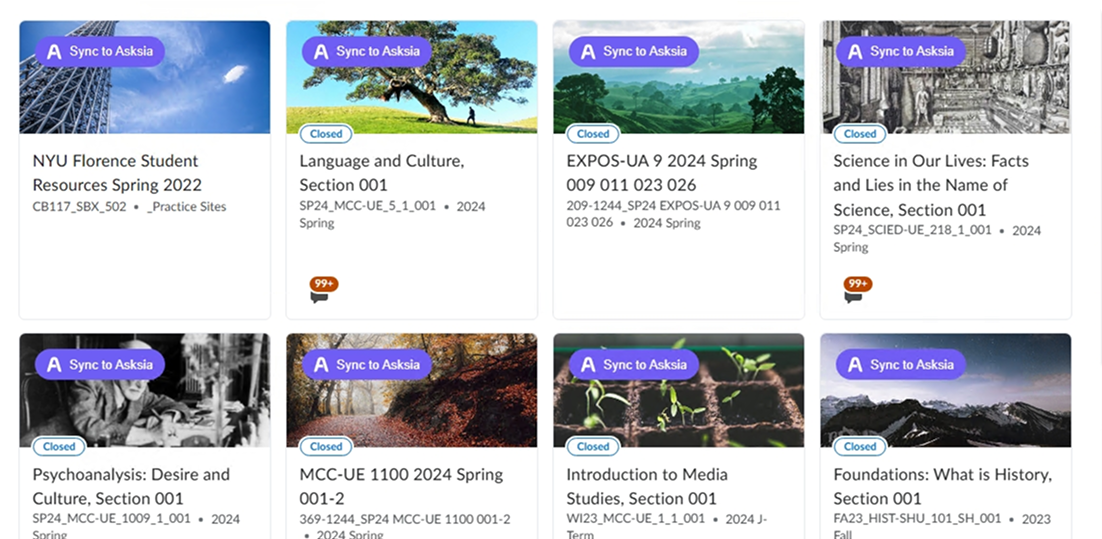
The extension walks Content Collection, Documents, Assignments and Discussions and brings every reading, slide deck and linked Panopto or Echo360 recording into AskSia. The folder structure stays intact.
15 to 45 seconds per course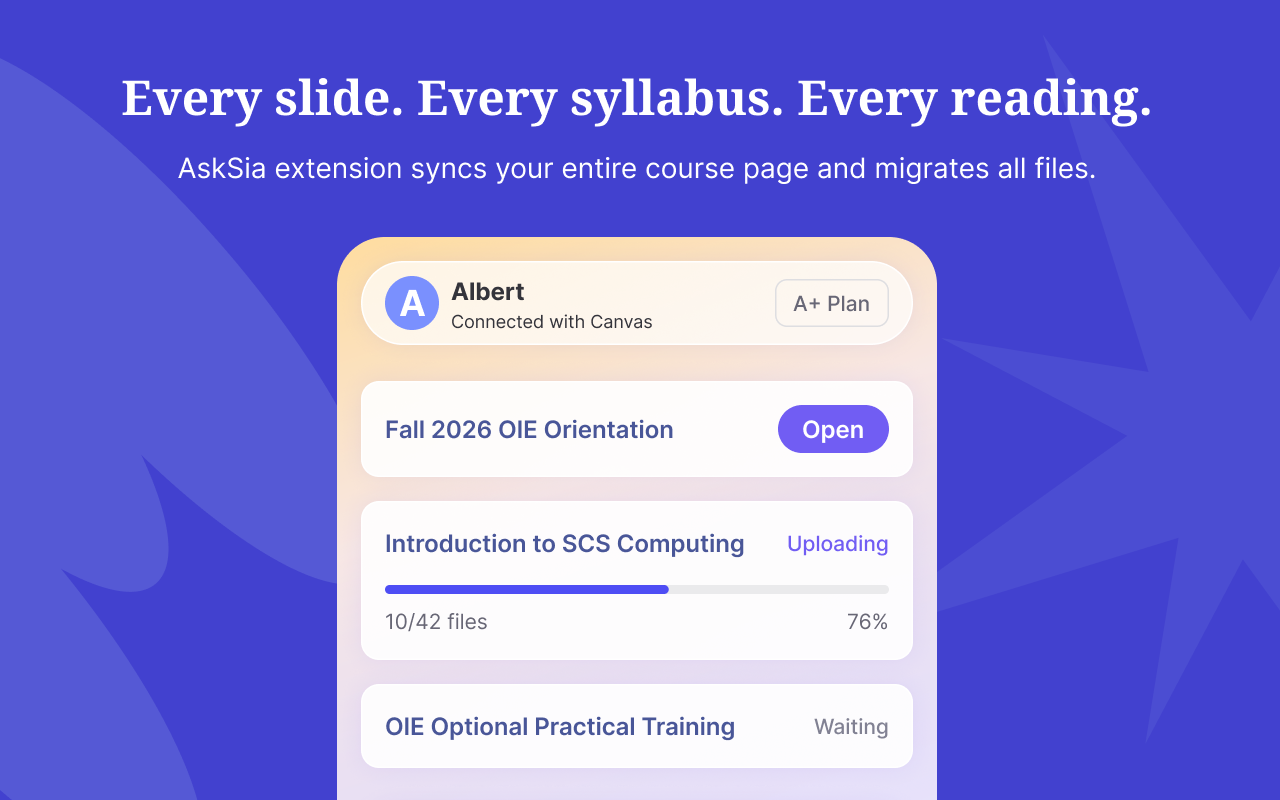
The course appears in your AskSia library with its module structure intact. Ask questions across every file with page-level citations, or turn it into Sia Notes, flashcards, practice exams and a study plan.
chat · notes · quizzes · planBlackboard is used at universities in every region, and yours may give it its own name. Here is what the public record shows: a sample of universities with public Blackboard guidance, a vendor customer story or a news report, plus the clues that tell you which platform you are on.
Some universities give Blackboard their own name. If your course site uses one of these names, it is Blackboard underneath, and the Sync button works the same way.
Open any course page and look at the address bar. A Blackboard address usually contains the parts highlighted below. The course menu also gives it away:
Runs Blackboard Learn Ultra as Learn.UQ. Lecture recordings on Echo360.
Runs Blackboard. Lecture recordings on Panopto.
Runs Blackboard Learn Ultra as Learn. Lecture recordings on Echo360.
Runs Blackboard Learn Ultra.
Runs Blackboard as MyAberdeen. Lecture recordings on Panopto.
Runs Blackboard. Lecture recordings on Panopto.
Runs Blackboard Learn Ultra.
Runs Blackboard Learn Ultra.
Runs Blackboard Learn Ultra.
Runs Blackboard Learn Ultra.
Runs Blackboard. Lecture recordings on Panopto.
Runs Blackboard Learn Ultra.
Moving all courses to Blackboard Learn Ultra by 2026.
Runs Blackboard. Lecture recordings on Panopto.
No match in this sample. That does not rule Blackboard out. Open any course page and check the address bar for the clues above. If they are there, the Sync button will appear.
A sample of 14 universities, each checked on 23 September 2026 against the university's own guidance, a vendor customer story or a news report. It is not a complete register. Universities change platforms, and some run more than one.
Lectures recorded on Echo360 or Panopto? AskSia also turns lecture recordings into Sia Notes.AskSia for Echo360AskSia for Panopto
Go to your Blackboard dashboard and AskSia will take it from there.
Blackboard stays Blackboard. AskSia becomes your study assistant. Once your courses are in AskSia, every file is searchable by chat and convertible into the format you study in.
“What did week 3 of Psychology say about defence mechanisms, and where does Literature cover it differently?” Sia answers with both citations.
Any synced lecture turns into a Sia Note: cues, content and a one-line summary, ready to review.
Turn any reading, lecture or chapter into flashcards, with spaced repetition built in.
Generate a timed quiz from the exam scope in your syllabus. Get scored, with explanations cited to your slides.
Sia picks up course end dates and assignment due dates from your LMS and reminds you by email, notification and the web app calendar.
Stuck while reading a course page? Ask Sia right there, without leaving your LMS.
A plan built from your synced course files, the due dates in Blackboard and your actual free time. Tell Sia when the exam is and how long you can study each day, and it orders your synced weeks: the ones you skipped first, then cards and quizzes week by week, then timed practice, with every Blackboard deadline marked. Change the inputs and the plan changes with you.
Illustrative example based on the course above. Your plan is built from your own synced files, Blackboard due dates and available time.
Sia picks up your course end date, assignment due dates and other key dates from your LMS, then reminds you by email, notification and in the web app calendar, so nothing important slips past while you catch up.
Your synced course does not have to stay in AskSia. Export summaries and notes to your own revision folder, or to Google Docs. Export options vary by plan.
Files you sync with the extension land in one AskSia library. Build your study plan from them and follow it in the web app or in the mobile app, or ask Sia a question right on your Blackboard page while the course is open.
Yes. Read-only on Panopto. No password shared. Delete anytime. Safe to install before finals.
The extension never writes, changes, submits, posts or deletes anything in Blackboard. It only reads what is already in front of you.
It uses your existing browser session. AskSia never sees, stores or asks for your Blackboard, university SSO or 2FA credentials.
Remove the extension in one click. Delete synced files anytime from your AskSia library. Your Blackboard data stays where it is.
Reviewed by Google and Microsoft before listing, and rated 4.8 on the Chrome Web Store. Your data is encrypted with TLS 1.3 in transit and AES-256 at rest.
The questions students ask before installing.
Yes. With the AskSia extension installed in Chrome or Edge, a Sync to AskSia button appears on every course card. It works on Blackboard Ultra and on Original course views, at any university, with no configuration.
Check the university list on this page, or open any course page and look at the address bar and the course menu: a Blackboard site has a recognisable address pattern and menu. If you are still unsure, install the extension and open a course. If the Sync to AskSia button appears, the page is supported.
The extension walks the Content Collection, Documents, Assignments and Discussions. Readings, slide decks and linked Panopto or Echo360 recordings come into your AskSia library with the folder structure preserved.
No. AskSia never sees, stores or transmits your LMS username or password. The extension uses the browser session you already logged into yourself. If you log out of your LMS, the extension cannot sync until you log back in. Your credentials never leave your browser.
No. The extension is read-only. It cannot submit assignments, take quizzes, post in discussions, message lecturers, change grades or modify anything. It does not request write permissions, so write actions are not possible even if there were a bug.
No. Content synced through the extension is never used to train AI models. Your files are processed only for your own questions, kept private to your account, and never shared or sold.
Yes. Open your AskSia library, select a course folder or a single file and click Delete. Deletion is immediate and permanent. Uninstalling the extension stops further syncing but does not delete files you already synced, which you can remove from your library separately.
The extension only reads materials you already have access to and writes nothing to your LMS, which is comparable to downloading the same files yourself. Using AskSia to understand material, build study guides, quiz yourself and review lectures is ordinary studying. Submitting AI-generated answers as graded work would breach most academic integrity policies. Rules differ between institutions and courses, so check your syllabus or honour code, and follow your institution's academic integrity policy.
Yes. AskSia is published on the Chrome Web Store and on Microsoft Edge Add-ons, so you can install it in Chrome, Edge, Brave or Arc. It works the same in each browser.
Installing the extension is free, and you do not need a credit card or an AskSia account to install it. Your first course sync is free too, and you can keep asking Sia questions about that course. Syncing more courses and the full feature set come with the AskSia A+ plan.
The extension runs in desktop browsers. Everything you sync appears in the AskSia web app and mobile app, so you can study from your phone after syncing on a computer.
One extension covers all of them. Open the guide for each platform to see what syncs.
Your Blackboard semester is waiting. Free to install on Chrome and Edge. Read-only. No account needed to install.
Last updated 23 September 2026. University listings are based on each institution's public guidance, a vendor customer story or a news report, and were checked on that date. Platform figures come from the sources named next to each figure.
Blackboard is a trademark of its owner. Chrome is a trademark of Google LLC, and Microsoft Edge is a trademark of the Microsoft group of companies. AskSia is an independent study tool and is not affiliated with, endorsed by or sponsored by them or by any university.


