
Intro Microeconomics
ECON 101-002 · Sec 2
Spring 2026
Install the extension and a purple Sync to AskSia button appears on every course card in your Canvas dashboard. One click brings every lecture, slide deck, reading and syllabus into your AskSia library, ready to chat with.
Free to install, first course sync free. Desktop Chrome, Edge, Brave and Arc.
AskSia for Canvas is a browser extension that adds a Sync to AskSia button to every course card in the Canvas dashboard. One click reads the course's Modules, Files, Assignments, Pages and Syllabus and copies the lectures, slide decks, readings and recordings into your AskSia library, with modules and weeks kept in order. It is read-only, so it never writes to Canvas and never sees your password. Installing it is free, your first course sync is free, and the full feature set comes with the AskSia A+ plan.
Three steps, about 30 seconds per course. From “Canvas is full of files” to “an AI study assistant across every course”.
Install the extension from the Chrome Web Store or Microsoft Edge Add-ons. Log in to your university's Canvas as you normally would. The extension adds a purple Sync to AskSia button to every course card. No extra menus and no settings page.
read-only, never writes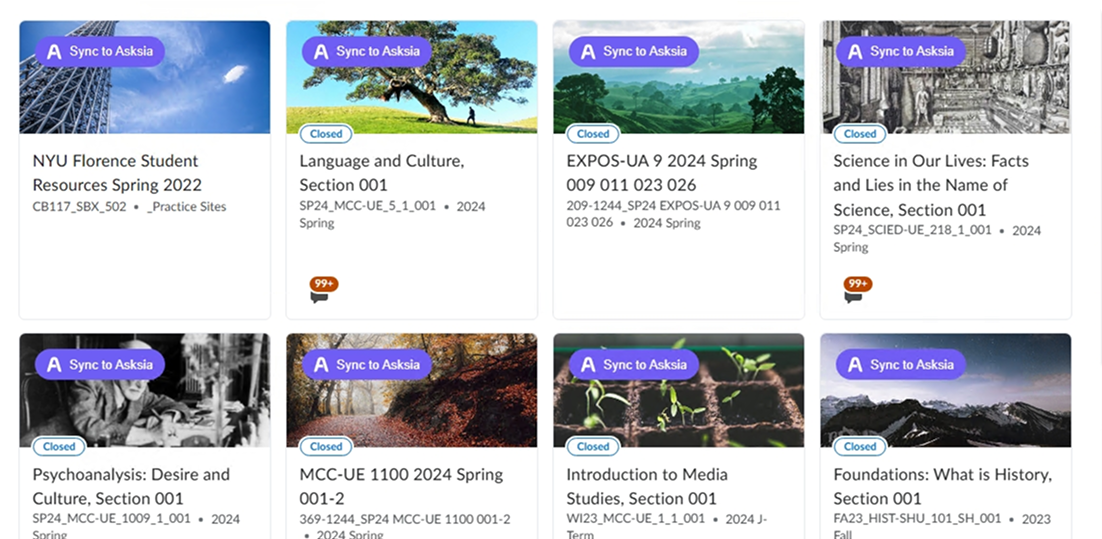
The extension walks Modules, Files, Assignments, Pages and Syllabus and brings every lecture PDF, slide deck, reading and recording into your AskSia library. Modules and weeks stay organised.
15 to 45 seconds per course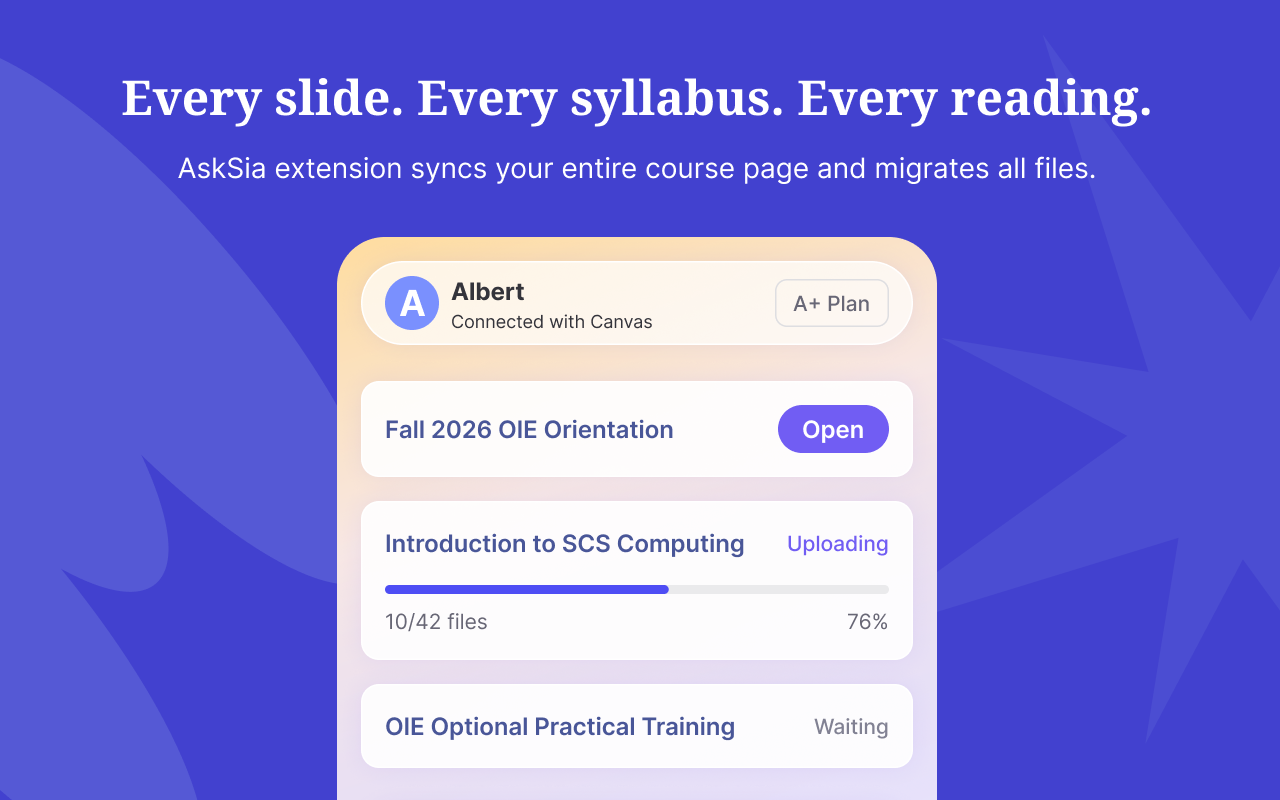
The course appears in your AskSia library with its module structure intact. Ask questions across every file with page-level citations, or turn it into Sia Notes, flashcards, practice exams and a study plan.
chat · notes · quizzes · planCanvas is used at universities in every region, and yours may give it its own name. Here is what the public record shows: a sample of universities with public Canvas guidance, a vendor customer story or a news report, plus the clues that tell you which platform you are on.
Some universities give Canvas their own name. If your course site uses one of these names, it is Canvas underneath, and the Sync button works the same way.
Open any course page and look at the address bar. A Canvas address usually contains the parts highlighted below. The course menu also gives it away:
Runs Canvas. Lecture recordings on Panopto.
Runs Canvas. Lecture recordings on Panopto.
Moving to Canvas: 2026.
Moving to Canvas: 2026.
Runs Canvas. Lecture recordings on Panopto.
Runs Canvas under the name Nuku.
Runs Canvas. Lecture recordings on Panopto.
Runs Canvas. Lecture recordings on Panopto.
Runs Canvas. Lecture recordings on Panopto.
Runs Canvas. Lecture recordings on Panopto.
Runs Canvas.
Runs Canvas. Lecture recordings on Panopto.
Runs Canvas.
Runs Canvas.
Runs Canvas. Lecture recordings on Panopto.
Runs Canvas. Lecture recordings on Panopto.
Runs Canvas.
Moving to Canvas: 2024 to 2026.
Runs Canvas under the name Quercus.
Runs Canvas.
Runs Canvas.
No match in this sample. That does not rule Canvas out. Open any course page and check the address bar for the clues above. If they are there, the Sync button will appear.
A sample of 21 universities, each checked on 23 September 2026 against the university's own guidance, a vendor customer story or a news report. It is not a complete register. Universities change platforms, and some run more than one.
Lectures recorded on Echo360 or Panopto? AskSia also turns lecture recordings into Sia Notes.AskSia for Echo360AskSia for Panopto
Go to your Canvas dashboard and AskSia will take it from there.
Canvas stays Canvas. AskSia becomes your study assistant. Once your courses are in AskSia, every file is searchable by chat and convertible into the format you study in.
“Compare how chapter 4 of ECON 101 and PSYC 100 define rational choice.” Sia answers with citations to both courses.
Any synced lecture turns into a Sia Note: cues, content and a one-line summary, ready to review.
Turn any reading, lecture or chapter into flashcards, with spaced repetition built in.
Generate a timed quiz from the exam scope in your syllabus. Get scored, with explanations cited to your slides.
Sia picks up course end dates and assignment due dates from your LMS and reminds you by email, notification and the web app calendar.
Stuck while reading a course page? Ask Sia right there, without leaving your LMS.
A plan built from your synced course files, the due dates in Canvas and your actual free time. Tell Sia when the exam is and how long you can study each day, and it orders your synced weeks: the ones you skipped first, then cards and quizzes week by week, then timed practice, with every Canvas deadline marked. Change the inputs and the plan changes with you.
Illustrative example based on the course above. Your plan is built from your own synced files, Canvas due dates and available time.
Sia picks up your course end date, assignment due dates and other key dates from your LMS, then reminds you by email, notification and in the web app calendar, so nothing important slips past while you catch up.
Your synced course does not have to stay in AskSia. Export summaries and notes to your own revision folder, or to Google Docs. Export options vary by plan.
Files you sync with the extension land in one AskSia library. Build your study plan from them and follow it in the web app or in the mobile app, or ask Sia a question right on your Canvas page while the course is open.
Yes. Read-only on Panopto. No password shared. Delete anytime. Safe to install before finals.
The extension never writes, changes, submits, posts or deletes anything in Canvas. It only reads what is already in front of you.
It uses your existing browser session. AskSia never sees, stores or asks for your Canvas, university SSO or 2FA credentials.
Remove the extension in one click. Delete synced files anytime from your AskSia library. Your Canvas data stays where it is.
Reviewed by Google and Microsoft before listing, and rated 4.8 on the Chrome Web Store. Your data is encrypted with TLS 1.3 in transit and AES-256 at rest.
The questions students ask before installing.
Yes. With the AskSia extension installed in Chrome or Edge, a Sync to AskSia button appears on every course card in your Canvas dashboard. It works on any university's Canvas, with no configuration and no approval from IT, because it only reads courses you can already open.
Check the university list on this page, or open any course page and look at the address bar and the course menu: a Canvas site has a recognisable address pattern and menu. If you are still unsure, install the extension and open a course. If the Sync to AskSia button appears, the page is supported.
The extension walks Modules, Files, Assignments, Pages and the Syllabus. Lecture PDFs, slide decks, readings and linked recordings come into your AskSia library with the module and week structure preserved.
No. AskSia never sees, stores or transmits your LMS username or password. The extension uses the browser session you already logged into yourself. If you log out of your LMS, the extension cannot sync until you log back in. Your credentials never leave your browser.
No. The extension is read-only. It cannot submit assignments, take quizzes, post in discussions, message lecturers, change grades or modify anything. It does not request write permissions, so write actions are not possible even if there were a bug.
No. Content synced through the extension is never used to train AI models. Your files are processed only for your own questions, kept private to your account, and never shared or sold.
Yes. Open your AskSia library, select a course folder or a single file and click Delete. Deletion is immediate and permanent. Uninstalling the extension stops further syncing but does not delete files you already synced, which you can remove from your library separately.
The extension only reads materials you already have access to and writes nothing to your LMS, which is comparable to downloading the same files yourself. Using AskSia to understand material, build study guides, quiz yourself and review lectures is ordinary studying. Submitting AI-generated answers as graded work would breach most academic integrity policies. Rules differ between institutions and courses, so check your syllabus or honour code, and follow your institution's academic integrity policy.
Yes. AskSia is published on the Chrome Web Store and on Microsoft Edge Add-ons, so you can install it in Chrome, Edge, Brave or Arc. It works the same in each browser.
Installing the extension is free, and you do not need a credit card or an AskSia account to install it. Your first course sync is free too, and you can keep asking Sia questions about that course. Syncing more courses and the full feature set come with the AskSia A+ plan.
The extension runs in desktop browsers. Everything you sync appears in the AskSia web app and mobile app, so you can study from your phone after syncing on a computer.
One extension covers all of them. Open the guide for each platform to see what syncs.
Your Canvas semester is waiting. Free to install on Chrome and Edge. Read-only. No account needed to install.
Last updated 23 September 2026. University listings are based on each institution's public guidance, a vendor customer story or a news report, and were checked on that date. Platform figures come from the sources named next to each figure.
Canvas is a trademark of its owner. Chrome is a trademark of Google LLC, and Microsoft Edge is a trademark of the Microsoft group of companies. AskSia is an independent study tool and is not affiliated with, endorsed by or sponsored by them or by any university.


