Open your Echo360 lecture
On your university's Echo360, EchoVideo, MonashCast or Lecturecast page, open a course Class List. The extension adds a purple Sync to Asksia button to every recording — no menus, no settings.
read-only · never writesInstall the extension and a purple Sync to Asksia button appears on every recording in your Echo360 / EchoVideo Class List. Click once — AskSia reads the whole lecture and gives you a Sia Note: a timestamped lecture arc, the key concepts ranked by exam emphasis, the traps your lecturer flagged, and the class Q&A.
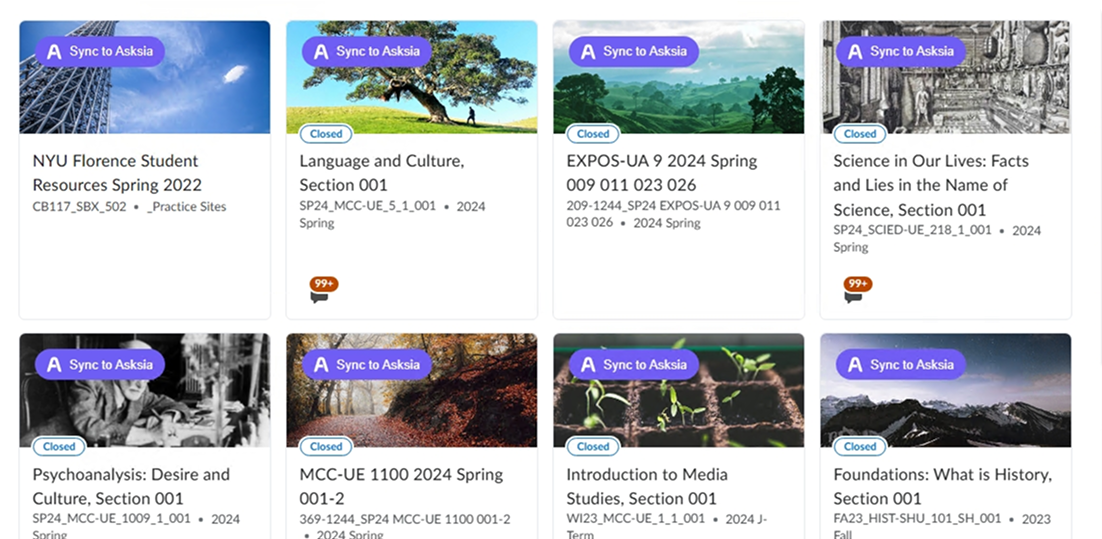
On your university's Echo360, EchoVideo, MonashCast or Lecturecast page, open a course Class List. The extension adds a purple Sync to Asksia button to every recording — no menus, no settings.
read-only · never writesThe extension pulls the lecture's transcript and slide timings into your AskSia library in 10–30 seconds. No download, no manual upload — and nothing is written back to Echo360.
10–30 sec per lectureAskSia reads the whole recording and returns a Sia Note: a timestamped lecture arc, key concepts ranked by exam emphasis, the traps your lecturer flagged, and the Q&A — ready to revise from.
arc · concepts · traps · Q&ANot a wall of transcript. AskSia reads the whole lecture and structures it the way you actually revise — every concept timestamped back to the moment in the recording, ranked by how hard your lecturer leaned on it.
Once a recording is a Sia Note, the whole lecture is chat-searchable and convertible into the format you actually revise in.
"At what minute did she define independent assortment?" Sia answers with the timestamp and jumps you there.
Every concept and trap links back to its timestamp in the recording — no scrubbing a 48-minute video.
Turn any Sia Note into spaced-repetition flashcards built from the concepts that actually got emphasized.
Generate exam-style questions from a week of Sia Notes. Get scored, with explanations cited to the recording.
Reads only the lecture you can already see. Never writes, modifies, submits, or deletes anything on your Echo360, MonashCast, or university LMS.
Uses your existing browser session. AskSia never sees, stores, or asks for your university login, SSO, or 2FA.
Uninstall from Chrome in one click. Delete synced lectures anytime from your AskSia library — your Echo360 stays put.
Verified publisher on the Chrome Web Store, with a clean policy record. 4.8 stars from 2M+ students.
Echo360, now branded EchoVideo, is a lecture-capture and video platform many universities in Australia, the UK and the US use to record lectures. Students watch recordings ("classes") in a course Class List, with synced slides, transcripts, playback-speed control, notes and bookmarks.
Yes. With the AskSia Chrome extension, a purple Sync to Asksia button appears on every Echo360 lecture. One click reads the recording's transcript and returns a Sia Note — a timestamped lecture arc, key concepts ranked by exam emphasis, the exam traps your lecturer flagged, and the class Q&A — in the language you study in.
A Sia Note turns a recording into a structured study page: a timestamped lecture arc you can scan, the key concepts ranked by how much the lecturer emphasized them (each linked to its moment in the video), the exam traps your lecturer flagged, and the questions asked in class. It is generated in the language you are reading in.
Those are just university names for the same Echo360 / EchoVideo platform (Monash, UQ, Imperial College London and others), so the AskSia Sync button works the same way on all of them.
No. AskSia is read-only and only uses the lecture content you are already allowed to see — your transcript, slide timings and metadata. It writes nothing back to Echo360 and never asks for your university password.
Echo360's Study Guide just collects the notes and bookmarks you made manually. AskSia auto-generates the whole Sia Note for you — the lecture arc, key concepts with timestamps, exam traps, flashcards and practice questions.
Yes. The AskSia Chrome extension is free to install from the Chrome Web Store and works on Chrome, Edge and Brave. No credit card and no account is required to start.
Any school using Echo360 / EchoVideo — including UniMelb, Monash, USyd, UNSW, UQ, UWA, Adelaide and ANU, plus many UK and US institutions. If your lectures open in Echo360, the Sync button appears.
Free Chrome extension. Works on Echo360, EchoVideo, MonashCast and Lecturecast. Read-only. No login required to start.
Install free on Chrome